How to Spot a Face Swap: Six Tells You Can Check in Seconds
You were sure, and then the reveal proved you wrong. It happens to everyone. Here is the slightly awkward part: we make face swaps on purpose. Guess the Celeb is a parody game, and many of our cards paste one famous person's eyes or smile onto another famous person's photo, then offer the owner of the pasted part as a decoy.
So this guide on how to spot a face swap comes from the workshop side. You get six visual tells you can check in seconds, a step-by-step routine for any suspicious photo, the context checks that catch what pixels miss, and a practice method where the answer is always shown. We also cover where editing a face stops being a joke.
Key takeaways
- Zoom in first. Most pasted faces give themselves away at 200 percent, not at phone size.
- Check six tells in order: the seam, the light, the grain, the eyes and teeth, anything crossing the edge of the face, and whether the age adds up.
- One tell is a reason to look closer. Two or three together are a strong signal.
- People are worse at this than they think. In one study, viewers caught only 60 to 65 percent of edited photos.
- Pixels are half the job. Find the first upload, run a reverse image search and look for Content Credentials.
- Missing metadata or missing credentials prove nothing either way.
- Practise on fakes that tell you they are fakes, then name the seam after every reveal.
In this guide
- How does face swap work? Pastes vs AI swaps
- How to spot a face swap: tells 1 to 3
- Tells 4 to 6: geometry, edges and age
- A step-by-step check for any suspicious photo
- Which tell matters most? A decision table
- Why your gut is worse at this than you think
- How to tell if a photo is photoshopped when there is no face
- Check the context: source, reverse search and Content Credentials
- Video swaps and AI swaps: what changes
- Practise on face swap examples that admit they're fakes
- Common mistakes when checking for a face swap
- Troubleshooting: when the checklist does not settle it
- When edits aren't OK
- The 30-second checklist
- FAQ
How does face swap work? Pastes vs AI swaps
There are two broad kinds, and they fail in different ways.
A paste is the old-school version. Someone cuts a region of one face (the eyes, the mouth, sometimes the whole oval), lines it up on another photo, blends the edges and nudges the colour so the join is harder to see. The parody cards in our game are this kind: edited composites built with face-landmark and image-editing tools, not generated by AI. Our About page explains how the game's edited images work: the images are edited on purpose and are not real photographs of real events.
An AI swap uses a trained model to redraw one person's face onto another person's head, often across every frame of a video. It does not leave a cut line in the same way, but it struggles with other things: moving glasses, blinking, lips that have to match speech.
Why does the difference matter? Because a paste is a join between two photos, and joins have edges. Most of the six tells below are really one question asked six ways: where do the two photos meet, and what disagrees across that line? AI swaps get their own section further down.
How to spot a face swap: tells 1 to 3
Run these in order. The first three are about the photo itself: where it was cut, how it was lit and how it was shot. Each takes a second or two.
1. The seam
A paste has a border, and the editor's whole job is to hide it. Look for a line where skin tone, texture or brightness changes for no reason: across the forehead, down the cheek, along the jaw, around the nose.
A pasted pair of eyes often sits in a slightly different shade from the cheeks below. A pasted mouth can leave a faint ring around the lips. Zoom in. A seam that vanishes at phone size can be obvious at 200 percent.
2. Light from two directions
Every photo has a light source, and every part of a real face agrees about where it is. Check the shadows under the brows, beside the nose and under the lower lip.
If the forehead is lit from the left but the pasted eye region is shaded as if the light came from the right, two photos have been joined. Brightness counts too. A face that is noticeably brighter or warmer than the neck and ears looks stuck on, because it was.
3. Sharpness and grain that don't match
Two photos rarely share the same camera, focus and compression. Crisp eyes on a soft, slightly blurry face are a giveaway. So is one patch of skin looking grainy while the patch beside it looks smooth and plasticky.
Look at the fine detail: eyelashes, pores, stray hairs. If one zone is full of it and the next is smeared flat, the two zones probably came from different files.
Tells 4 to 6: geometry, edges and age
The next three tells are about the face as a face. Even a perfectly blended paste has to fit the head it was pasted onto, and faces are unforgiving about fit.
4. Eyes and teeth that sit slightly wrong
Small misalignments read as "off" even when you can't say why. Check whether the eyes are level with each other and with the tilt of the head, whether the gaze points the same way, and whether both eyes are the same size.
Reflections in the two eyes should usually agree with each other. For smiles, check the teeth: a pasted mouth can sit a touch too high, too wide, or at an angle the jaw does not share.
5. Glasses, earrings and the hairline
Anything that crosses the paste boundary is hard to fake. Look for a glasses frame that bends or breaks where the pasted region starts, earrings that don't match, a fringe that ends abruptly, or a faint halo along the hairline.
Hands near the face are worth a look too. Fingers resting on a cheek have to overlap the paste cleanly, and that is fiddly work.
6. An age that doesn't add up
This one comes from the MIT Media Lab's Detect Fakes project, which asks you to check whether the skin of the cheeks and forehead looks too smooth or too wrinkled, and whether its apparent age matches the hair and eyes.
A twenty-something's eyes in a face with deep laugh lines, or baby-smooth skin under grey hair, is a strong hint that two people are involved. The same project lists eyebrow shadows, glasses glare, facial hair and moles as checkpoints, and says plainly that there is no single tell-tale sign.
A step-by-step check for any suspicious photo
The six tells are what to look for. This is how to detect a face swap quickly and in order, so you don't skip the boring parts when an image is exciting.
Step 1: Pause before you react
The photos most worth checking are the ones that make you want to share them right now. Give it ten seconds first. That is enough for the whole routine below.
Step 2: Get the biggest version you can
Open the original post rather than a forward or a screenshot. Every re-share and screenshot squashes detail, and detail is where tells live.
Step 3: Zoom to the seam zones
Pinch in on the places where pastes usually meet: the line across the forehead, the cheeks under the eyes, the jawline, the edge of the lips. Run tells 1 to 3 here.
Step 4: Zoom out and check the fit
Now look at the whole head. Run tells 4 to 6: eye level, gaze, teeth, glasses, earrings, hairline, age. A paste can be invisible up close and still sit at the wrong angle from a distance.
Step 5: Leave the image and check the context
Who posted it first? Is there an older or different version? Does it carry a provenance record? The context section below covers each in a minute or two.
Which tell matters most? A decision table
Not all face swap tells carry the same weight. Use this table to decide how seriously to take what you found.
| What you see | Where to look | What it usually means | How strong |
|---|---|---|---|
| A line where skin tone or texture changes | Forehead, cheeks, jaw, around the lips | Two photos joined | Strong |
| Shadows that disagree about the light | Under brows, beside the nose, under the lip | Two photos joined | Strong |
| One zone sharp, the next soft | Eyelashes, pores, stray hairs | Two files, different cameras or compression | Medium |
| Eyes not level, gaze split, teeth tilted | Eyes, mouth, jaw angle | A feature placed by hand | Medium |
| Glasses or hairline broken at an edge | Frames, earrings, fringe, fingers | Something crossed the paste boundary | Strong |
| Skin age that fights the hair and eyes | Cheeks, forehead, hair colour | Two people involved | Medium |
| Blur and blocky noise everywhere | Whole image | Heavy compression, not proof of anything | Weak |
Rule of thumb: one strong tell, or two medium ones, is enough to treat the photo as edited until the context says otherwise. A single weak tell is just a bad copy.
Why your gut is worse at this than you think
Most of us assume we would notice. The research says otherwise.
In a 2017 study by Nightingale, Wade and Watson, people looked at photos of real-world scenes, some original and some edited, and correctly flagged only 60 percent of the edited ones in the first experiment and 65 percent in the second. Put the other way round, roughly a third or more of the edits slipped past.
Spotting that something is wrong is also not the same as knowing what. Across all the edited photos, people could point to the actual change only 45 percent of the time in the first experiment and 56 percent in the second.
The most useful finding for this guide is about what made edits easier to catch. The authors concluded that the amount of change mattered more than how plausible it was. Big edits got noticed. Small, careful ones did not.
A careful face paste is exactly that kind of small edit. That is why "it looks off" is a reason to look closer, not a verdict, and why a checklist beats a vibe. It makes you inspect the parts of the image your brain usually fills in for you.
How to tell if a photo is photoshopped when there is no face
The same thinking works on any edited image, faces or not. The 2017 study above used four kinds of edit, and they make a handy checklist for how to tell if an image is edited in general.
- Airbrushing. Skin with no pores, teeth whiter than the eyes, wrinkles gone on one side only. Check the texture against the rest of the photo.
- Something added or removed. A person, sign or object that sits in the scene without a shadow, or a gap where the background repeats itself. Look for copy-pasted patches of grass, brick or crowd.
- Bent geometry. Door frames, tiles and building edges that curve near a body usually mean something was stretched or slimmed.
- Shadows that disagree. One shadow falls left, another falls right, under a single sun. This is the light tell from above, applied to the whole scene.
The seam, light and grain tells carry over directly. Anywhere two pieces of different photos meet, at least one of them tends to show.
Check the context: source, reverse search and Content Credentials
Pixels are only half the job. The other half is asking where the image came from. These checks often settle a case faster than any zooming.
Find the first upload
Scroll back to the earliest post you can find. Who posted it, when, and with what caption? A face swap labelled as a joke by its maker often loses that label three shares later.
Run a reverse image search
Upload the image, or a crop of the face, to a reverse image search such as Google Lens, Bing Visual Search or TinEye. If an older, unedited version turns up with a different face or a different setting, you have your answer. Search a crop of the background too, since swaps often keep the original scene.
Look for Content Credentials
Some files carry Content Credentials, a signed record of where a file came from and how it was edited, built on the open C2PA standard. The C2PA explainer describes a Content Credential as a cryptographically bound record of an asset's provenance, and says each editing action can be recorded in it.
Two cautions from the same explainer. Adding provenance is optional, so a file without credentials is not suspicious by default. And an edit made with a tool that does not support Content Credentials may not be recorded at all.
Metadata: useful, but easy to lose
Your gallery's info or details panel shows whatever photo metadata survived: camera model, date, sometimes a location. Many apps rewrite or remove that data when a photo is uploaded or forwarded, so missing metadata proves nothing.
Some services strip it on purpose to protect the person who took the photo. If you share photos of your own street, it is worth knowing how to do that yourself; this guide to removing location from a photo before you report a hazard walks through it on a phone.
Video swaps and AI swaps: what changes
AI swaps and video add new tells and remove some old ones. A model that redraws every frame rarely leaves a clean seam, so you lean less on tells 1 and 3 and more on movement.
MIT's Detect Fakes checklist covers the video side well:
- Blinking. Does the person blink at a normal rate, or far too often or too rarely?
- Lips. Do mouth movements match the words, especially on sounds like "p", "b" and "m" where the lips close?
- Glasses glare. Does glare shift naturally as the head turns, or stay oddly fixed?
- Facial hair and moles. Do they look real, and do they stay put from frame to frame?
Slowing a clip down or stepping through it frame by frame makes glitches easier to catch, especially when the head turns sideways or a hand passes in front of the face. Those are the moments a swap has to work hardest.
The context checks matter even more for video. Find the original upload, search for stills from the clip, and look for a provenance record on the file before trusting any single frame.
Practise on face swap examples that admit they're fakes
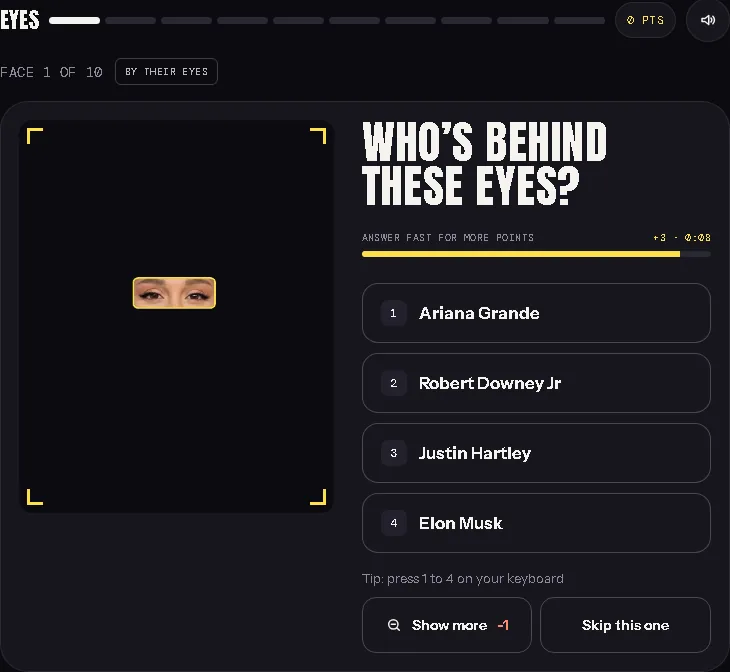
The fastest way to learn how to spot a face swap is volume: lots of examples, each followed by the answer. That is basically what a round of Guess the Celeb is.
You see a tight crop, pick from four names, then the full image is revealed. Because many cards are deliberate edited composites, the reveal is often the moment you find out the eyes were someone else's. These are face swap examples that tell you they are fakes, which is exactly what practice needs.
A practice routine for one round
- Before you tap, look for any of the six tells in the crop itself. Is the skin tone even? Is the light consistent?
- Pick your answer and commit.
- After the reveal, find the seam. Where did the paste start? Which way is the light coming from in each half?
- Say out loud which tell gave it away, or which one you missed.
- Play the next card. Ten cards with a named tell each beat fifty cards played on autopilot.
Which rounds train which tell
- Subtle seams: start with a 10-face easy round you can play without signing in. Easy cards are built to be believable, so the joins are hard to see.
- Absurd pastes: Insane cards are deliberately over the top. They open up once you score 6 out of 10 on the hard celebrity quiz, which also uses tighter crops. Seeing both levels shows you the same tells at different strengths.
- Eyes and light: guess the celebrity by their eyes. A crop that small leaves you almost nothing but colour, light and catchlights.
- Teeth and jaw: the smile-only round trains tell 4 on mouths.
- A daily habit: today's three-face daily celebrity round takes a couple of minutes and needs a free Google sign-in.
Want to turn it around? You can mix a prank quiz from the library's parody faces and send your friends the link, or play the same faces live in a multiplayer celebrity quiz for up to 10 players. If you host quiz nights, Picture Round Ideas Beyond Famous Faces has more ways to use crops in a round.
Common mistakes when checking for a face swap
- Calling it on one weak tell. Blur and blocky noise usually mean compression, not editing. Wait for a strong tell or two medium ones.
- Checking only the eyes. Pastes often hide well at the eyes and fail at the jaw, the hairline or the ears. Check the whole head.
- Trusting a filter as proof. Beauty filters smooth skin and reshape faces on their own. Smooth skin alone does not mean two people were joined.
- Treating no metadata as guilt. Many apps strip it. Absence is normal.
- Treating no Content Credentials as guilt. Credentials are optional. Their presence tells you something; their absence does not.
- Skipping the context. A two-minute reverse image search often beats ten minutes of zooming.
- Sharing first and checking later. Once it is forwarded, a correction rarely travels as far.
Troubleshooting: when the checklist does not settle it
Sometimes you run every check and still can't tell. Here is what to do in the common cases.
- The image is tiny or heavily compressed. Seams and grain disappear in small files. Lean on geometry, edges and age, then go hunting for a bigger copy with a reverse image search.
- It is a screenshot of a screenshot. Each generation loses detail and metadata. Find the original post before judging.
- A beauty filter is in play. Filters blur seams across the whole face. Check the edges that filters struggle with: glasses, hair over the forehead, hands.
- It is a group photo. Compare the suspect face with the people beside it. Same light, same grain, same sharpness? If one face is the odd one out, that is your tell.
- It is a drawing, render or meme template. The tells assume a photograph. For illustrations, context is the only reliable check.
- You still can't decide. Say so. "I can't verify this" is an honest answer, and it is better than a confident wrong one.
When edits aren't OK
Face swaps are a long-running joke format, and the difference between a joke and a lie is labelling. Our cards are parody, every round ends with a reveal, and nobody pictured is presented as endorsing anything. Our About page also asks players not to share the images as if they were real.
Now flip it. Some images exist precisely so that people can trust them. A civic map where residents photograph a pothole or an open manhole is a good example, because the photo is the evidence.
Potholes.app is an independent civic map for Pune and Pimpri-Chinchwad, and it is not a PMC or government app. Its rules show what trustworthy photos look like in practice. The Potholes community guidelines for hazard photos say to photograph the hazard, not bystanders, to crop faces and number plates when you can, to pin the actual location, and never to invent hazards. The privacy policy explains how Potholes strips location and camera details from report photos: images are re-encoded before upload, which removes embedded location, camera and time details, while videos are uploaded as recorded and may keep their own metadata.
Then the street checks the picture. The About page describes how neighbour confirmations keep each pin honest: the map stays public so neighbours can confirm what is still there and what has been repaired.
That is the useful rule. You can change the file: resize it, compress it, strip its metadata, crop away people who are not the point. You must never change the thing the photo is evidence of. A face swap labelled as parody is a game. The same edit passed off as evidence, whether of a pothole, an event or what someone said, is deception.
The 30-second checklist
Here is how to spot a face swap when you only have half a minute and a phone screen.
- Seam: a line where skin tone, texture or brightness changes for no reason.
- Light: shadows under brows, nose and lip all agree on one light source.
- Grain: sharpness and noise match across the whole face.
- Geometry: eyes level and the same size, gaze aligned, teeth sitting naturally in the jaw.
- Edges: glasses, earrings, hands and the hairline cross the face cleanly.
- Age: skin, eyes and hair belong to the same person at the same age.
- Context: original source found, older versions checked, provenance record looked for.
None of these is proof on its own, but two or three together are a strong signal.
FAQ
Is face swap safe?
It depends on what you swap and where it goes. Playing with clearly labelled parody, like a quiz that reveals the answer, is low risk. The risks start with consent and sharing: a swap of a private person, or one that loses its label and circulates as real, can hurt someone. If you use a face swap app, read what it does with uploaded photos before you hand it your face or a friend's. And never pass an edited face off as a record of something that happened.
How can I tell if a photo has been photoshopped on my phone?
Open the largest version you can find, then pinch to zoom on the seam zones: forehead, cheeks, jawline and lips. Check that the light and grain agree across the face, then zoom out to check eye level, glasses and hairline. Your gallery's info panel may show surviving metadata, but many apps remove it, so treat it as a bonus. Finish with a reverse image search from your phone's browser or a lens app.
Can you detect a face swap from a screenshot?
Sometimes. Screenshots keep geometry tells, like tilted eyes, broken glasses frames and a mismatched age, but they lose fine grain and all original metadata. A screenshot of a screenshot loses even more. Use the screenshot to decide whether the image is worth checking, then find the original post and run the full routine on that.
Are the faces in Guess the Celeb real photos?
No. Many cards are deliberate parody composites: one famous person's feature pasted onto another famous person's photo, with the owner of the pasted part offered as a decoy. They are edited images made for the game, not real photographs of real events, and nobody shown endorses the site. If you appear in a quiz, the About page explains how to ask for a removal.
What is the difference between a face swap and a deepfake?
A face swap is any image where one person's face, or part of it, ends up on someone else. It can be a hand-made paste or a model's output. "Deepfake" usually means an AI-generated swap, often in video. Pastes tend to fail at seams, light and grain. AI swaps tend to fail at movement: blinking, lip sync and glare that does not shift as the head turns.
Can an app tell me for sure whether a face was swapped?
Treat any single tool as one more clue, not a verdict. Visual checks, the original source, older versions found by reverse search and any Content Credentials together give a far better answer than one score. When nothing settles it, the honest conclusion is "unverified", and that is a fine thing to say before you share.
Where to go next
Reading about how to spot a face swap only gets you so far. Put the six tells to work where the answer is always shown. Start with an Easy practice round, name the tell on every reveal, and move up to Hard when the seams start jumping out at you. When you want a break from squinting, our guides for quiz hosts and players cover picture rounds, quiz nights and more.
And if you live in Pune or Pimpri-Chinchwad, the same habits make you a better civic witness: shoot the hazard, keep the frame honest and let neighbours check it. You can pin a road hazard photo on the Pune civic map and follow the repair in public.